
If you've ever wondered is my website hosted in Canada? and weren't 100% sure of the answer, you're in good company. I've talked to small business owners who paid for "Canadian hosting" for years, only to find out their site was actually sitting on a server in Texas or Dublin.
The hosting company's marketing said one thing. The IP told a different story.
Where your website is hosted can affect response times for Canadian visitors and how you assess data residency. But a Canadian IP address does not prove Canadian ownership or compliance with privacy laws such as PIPEDA, and server location is not a shortcut to higher Google rankings.
In this guide I'll show you four ways to investigate a website's hosting location, often in just a few minutes. I'll also explain the gotchas (looking at you, Cloudflare) that can hide the true origin server.
Quick answer: Check your domain's public IP, examine its geolocation and ASN or RDAP records, then look for a CDN or reverse proxy. These checks identify visible hosting infrastructure, not necessarily the true origin or backup locations. If you're researching a new provider, explore the Canadian-owned web hosting companies directory for ownership and infrastructure details.
Why Hosting Location Matters
Three reasons keep coming up in conversations with site owners:
Speed for Canadian Visitors
Network distance can affect latency, but routing, peering and caching also change response times. Look at the complete network path:
- Canadian origin servers may offer shorter routes for nearby visitors.
- A CDN can serve cached files locally even when the origin is outside Canada.
- Actual response times vary by network, server load and application configuration.
Google's page experience guidance includes Core Web Vitals, but a nearby server is only one part of making a website fast.
Privacy and Data Residency
PIPEDA doesn't strictly require Canadian hosting, but cross-border data adds compliance overhead:
- Identifying where customer data is stored, processed and backed up
- Assessing third-party processors and their contractual safeguards
- Checking access from other jurisdictions and subcontractor arrangements
- Reviewing additional requirements under Quebec's Law 25 where applicable
Hosting in Canada can make some data-location questions easier to answer, but it does not eliminate privacy or security obligations.
Local SEO Signals
Google may consider server location when assessing a site's intended audience, but it is not a dependable ranking boost. A .ca domain, local language and relevant Canadian content are clearer geographic signals.
So is your site actually hosted where you think it is? Let's find out.
The Fast Way: Use a Hosting Checker
The quickest method is a free tool that does all the lookups for you. I built one for HostFinder.ca specifically because most other options online either show stale data or get fooled by CDNs.
Drop any domain into the checker below. It checks visible IP addresses, network information and estimated locations to assess whether the publicly exposed infrastructure appears Canadian.
Enter a domain to check its visible IP, network operator, approximate location and CDN signals. A reverse proxy can conceal the true origin server.
If you want to understand how the answer is determined rather than just trust the tool, here's what's happening under the hood.
How to Check Where a Website Is Hosted (Manually)
You can verify any website's hosting location manually using tools already on your computer. No software to install. Here's the order I do them in.
Step 1: Ping the Domain to Get the IP
Open Terminal (Mac/Linux) or Command Prompt (Windows) and type:
ping hostfinder.ca
If the domain responds, ping may display a public IP address. Copy it down. The address may belong to a CDN or reverse proxy rather than the origin, and some servers block ping altogether.
Step 2: Run a WHOIS or RDAP Lookup
IP registration and RDAP records identify the organization associated with an IP allocation; they do not necessarily identify the company hosting the website or where the server is physically located.
For an IP address, use the HostFinder IP Lookup to review available geolocation, ASN and RDAP details. Domain WHOIS records are a different check: they describe domain registration, not physical web hosting.
What to look for in the results:
Country: CAsuggests a Canadian registry or allocation record.Country: USindicates a US-associated registration, not necessarily a US server.- Any country code is one clue; verify network routing and hosting location separately.
Reality check: the country in WHOIS is where the IP block was allocated, not always where the server lives right now. Big providers shuffle IPs between data centres. Use this as a strong signal, then verify with geolocation.
Step 3: Check the IP Geolocation
RDAP describes registration. IP geolocation estimates where an address is used, but it does not prove the exact location of the website's physical server.
Free tools I use for this:
- ipinfo.io — clean web interface, includes ASN and organization
- db-ip.com — city-level accuracy, free lookups without signup
- ipgeolocation.io — useful for cross-referencing the other two
Look for agreement across several data sources. A result such as "Toronto, ON" is a useful clue, not definitive proof; a CDN or cloud network can make the visible IP differ from the origin server.
Step 4: Inspect the Network Path with Traceroute
Traceroute can show some network hops between you and a destination IP. It is useful supporting evidence, but behind a CDN it generally traces the CDN edge rather than revealing a hidden origin server.
traceroute hostfinder.ca   # Mac / Linux
tracert hostfinder.ca      # Windows
You'll see the hops that respond along the route; some routers do not reply. Hostnames sometimes hint at network hubs or cities, but they are not location proof. For example:
- A hostname containing
tororyyzmay suggest a Toronto network hop. - A hostname containing
mtlmay suggest Montreal. - A hostname containing
yvrmay suggest Vancouver. - A hostname containing
iadmay suggest a Northern Virginia routing hub. - Network naming conventions vary, and intermediate hops are not the origin's address.
Common Gotchas That Fool Most Checks
A few things will throw off your investigation if you're not watching for them.
How to Tell If a Website Uses Cloudflare
Cloudflare is the biggest source of false positives in hosting lookups. It's also the easiest gotcha to detect once you know what to look for.
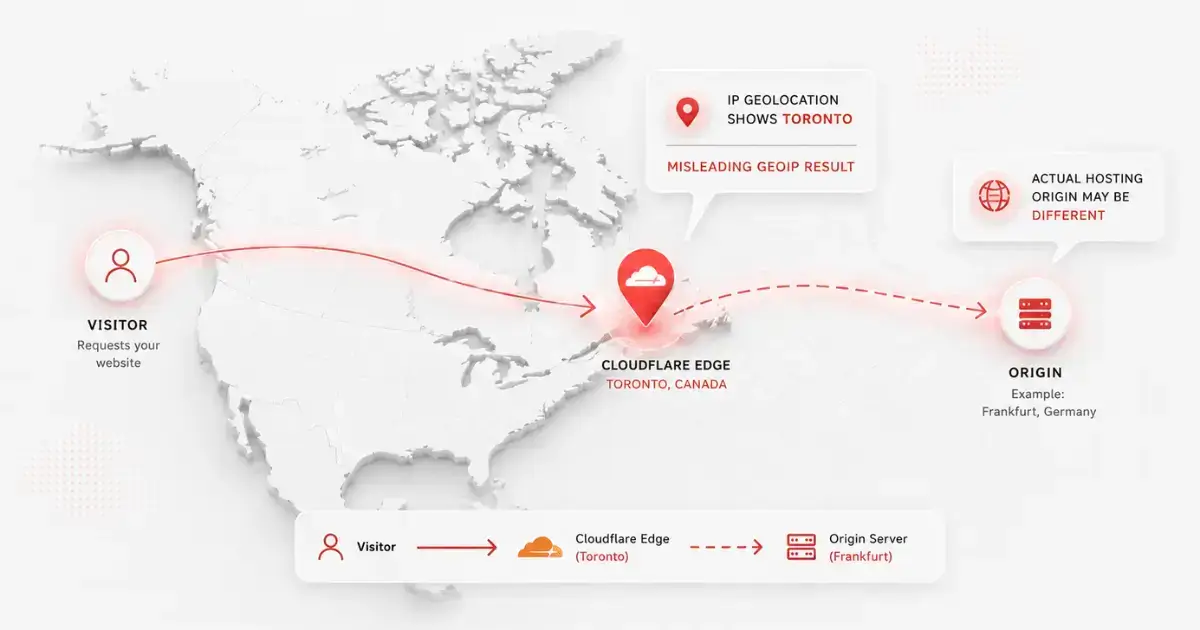
Telltale signs a site is sitting behind Cloudflare:
- The visible IP belongs to a published Cloudflare address range, not merely an IP starting with a particular number
- WHOIS shows the IP owner as Cloudflare Inc.
- The site's nameservers end in
.ns.cloudflare.com - The geolocation result changes depending on where you are checking from
Why this matters: A Cloudflare IP can identify an edge location rather than the underlying hosting server. If the origin location matters, confirm it through your hosting account, documented server region or the provider directly.
Does a .ca Domain Mean Canadian Hosting?
This is one of the most common assumptions, and it's wrong.
A .ca domain does not establish where your website is hosted. Domain eligibility and server location are separate checks:
- Domain registration: a .ca registrant must meet CIRA's Canadian Presence Requirements.
- Web hosting: the underlying server and backup locations need separate verification.
You can have a .ca domain pointing to a server in Texas or a .com domain hosted in Toronto. A domain extension alone does not establish where your files are stored. Use network lookups as clues, then confirm origin and backup locations with your host.
What to Do If Your Site Isn't Hosted in Canada
If you just ran the checks and realized your site is sitting on a server in Texas, you've got two options.
Option A: Stay Put and Add a CDN
This works if:
- You have no contractual requirement to keep primary website data in Canada
- Performance for your Canadian visitors is already acceptable
- You have reviewed privacy requirements and third-party data locations
This is a performance-focused option: a CDN with Canadian edge locations can reduce delivery time for cached content. It does not move the origin server or guarantee Canadian data residency.
Option B: Migrate to a Canadian Host
If a Canadian server location is important to your business, moving to a provider with a verified Canadian hosting option is worth considering. Potential benefits include:
- Potentially shorter network routes for Canadian visitors
- Clearer documentation of primary server and backup locations
- CAD billing when the selected provider actually charges in Canadian dollars
- A chance to review privacy safeguards and third-party services before migrating
Some Canadian hosts offer assisted website migration, sometimes at no extra charge. Confirm what is included, test the new site and email before changing DNS, and allow enough overlap to avoid downtime. Timing varies with the website and provider.
Best Canadian Hosts for Switching
I review every host on the HostFinder directory personally, including verifying the physical office address and confirming where their data centres are located. Here are the three to start with, depending on what you need.
Based in Victoria, BC, FullHost offers Canadian web hosting, managed WordPress and cloud VPS. A free .ca domain is available with eligible plans; confirm current pricing and terms.
Headquartered in Laval, Quebec, PlanetHoster offers WordPress and managed cloud hosting, its own N0C platform and French-language support. Confirm the Canadian server region available for your plan.
Montreal-based since 2003, with Canadian hosting regions in Montreal, Toronto and Vancouver and 24/7 bilingual support. WHC's Pro introductory plan is advertised from C$3.92/month on eligible terms; verify renewal pricing.
The Bottom Line
You can investigate visible website hosting signals in a few minutes. Enter your domain in the HostFinder Host Checker or work through DNS, RDAP, geolocation and traceroute manually to see what each method reveals and where its limits lie.
If the checks suggest your site is hosted elsewhere, ask your provider to confirm the origin, backups and support access. Moving to a Canadian server may be worthwhile, but the right choice depends on your audience, technical needs and privacy obligations.