
Managed Hosting vs Website Maintenance
A website breaks, the owner contacts their managed host, and the host replies:
"That's a code issue. You'll need to contact your developer."
That is one of the most common frustrations in web hosting. Many business owners hear "managed hosting" and assume it means the host manages the entire website. In most cases, that is not true.
Managed hosting usually means the hosting company manages the server environment, not the website code itself.
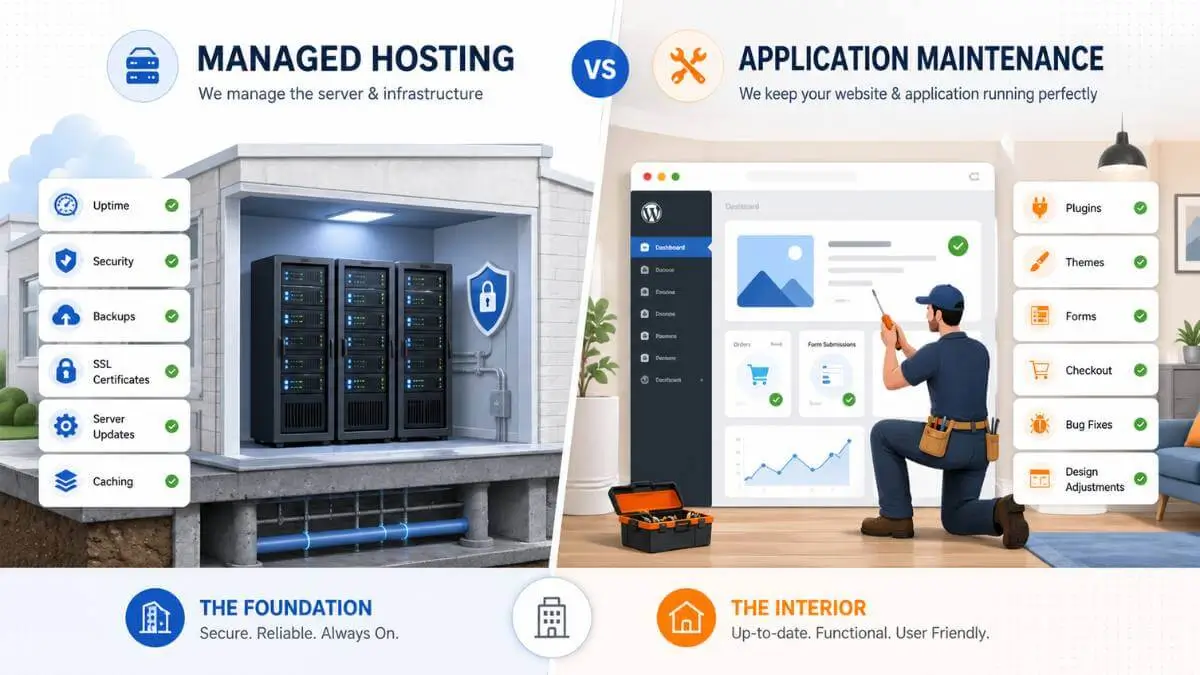
🏢 The Simple Analogy
Managed hosting is the landlord. They keep the building safe, powered, and secure. Application maintenance is the handyman. They fix the broken sink, replace appliances, paint the walls, and repair the inside of the unit. Your website works the same way — the host keeps the server running, a developer keeps the actual website working.
What Is Managed Hosting?
Managed hosting covers the technical foundation underneath your website. In plain English, it means: "We keep the server healthy so your website has a stable place to run."
That is valuable — but it has limits. If the server is working properly but your WordPress theme breaks, your checkout fails, or a plugin causes a fatal error, that is usually not a hosting issue. That is an application issue.
What Managed Hosting Typically Includes
Where Managed Hosting Stops
Managed hosts usually stop when the problem is caused by your actual website. Your host may help identify the problem, but they usually will not rewrite code, debug plugins, or fix a broken layout.
For example, your host might say: "The server is online, but your theme is causing a PHP error." That means the foundation is fine — but something inside the website needs repair.
What Managed Hosting Usually Does NOT Cover
Why This Confusion Happens
The word "managed" causes the confusion. To a business owner, it sounds like "they manage my website." To a hosting company, it usually means "we manage the hosting environment." Those are not the same thing. Some premium managed WordPress hosts may help with basic WP issues, but most do not fix custom code, plugin conflicts, or checkout problems as part of standard hosting. Always ask what your plan includes.
What Is Application Maintenance?
Application maintenance covers the actual website software. This is what you need when the website itself is broken, even if the server is working fine. It is usually handled by a developer, agency, freelancer, or website maintenance provider.
According to Wordfence's vulnerability database, thousands of WordPress plugin vulnerabilities are discovered each year — which is why regular plugin updates and testing are critical parts of website maintenance, not something to leave on autopilot.
Common Application Maintenance Tasks
Safely updating plugins and themes
Not just clicking "update all" — testing the site after each update to catch conflicts before visitors do.
Fixing plugin conflicts
When two plugins clash or an update breaks functionality, someone needs to isolate and resolve it.
Repairing broken forms and checkout
Forms stop sending, checkout hangs after payment, SMTP breaks — all application-layer issues.
Cleaning database bloat
Old revisions, expired transients, abandoned plugin tables, and spam comments slow the site from the inside.
Resolving WordPress critical errors
The white screen of death, PHP fatal errors, and recovery mode — almost always a plugin or theme issue.
Fixing mobile layout problems
Broken responsive layouts, overlapping elements, and unreadable text on phones are theme or CSS issues.
Troubleshooting slow pages
When the server is fast but the site still loads slowly, the problem is inside the website — images, scripts, plugins, or queries.
Removing malware from website files
Your host may block the infection at the server level, but cleaning the actual website files and finding the entry point is application work.
A host gives your website a stable place to live. A maintenance provider makes sure the website itself stays healthy. They are different jobs.
Who to Call: Quick Decision Table
When something goes wrong, the first question is always: is this a server problem or a website problem? This table helps you figure out who to contact first.
The Simple Rule
If the server is broken, call the host. If the website is broken, call your developer. If you are not sure, check with your host first — they can usually tell you whether the problem is on their side or yours.
Questions to Ask Your Host Before You Need Help
Before assuming your managed host covers everything, ask these questions. The answers will tell you whether you also need a separate website maintenance plan.
Ask Your Host These Questions
- Do you update WordPress plugins and themes?
- Do you test the site after updates?
- Do you fix plugin conflicts?
- Do you troubleshoot contact forms?
- Do you fix WooCommerce checkout issues?
- Do you clean malware from website files?
- Do you restore backups if something breaks?
- Do you help with custom code issues?
- What exactly is considered "out of scope"?
If the answer to most of those is "no" or "only on higher-tier plans," you need someone else responsible for the application layer. That could be a developer, an agency, a freelancer, or a dedicated WordPress maintenance service.
According to WordPress.org's own security documentation, keeping WordPress core, plugins, and themes updated is one of the most important steps in maintaining a secure website — and that responsibility falls on the site owner, not the hosting company.
Do You Need Both?
For most business websites, yes.
Managed hosting protects the server. Application maintenance protects the website. If your site only has a few pages and rarely changes, you may not need much maintenance. But if your website generates leads, sells products, takes bookings, or supports customers, you should have someone responsible for the application layer.
Otherwise, when something breaks, you may get stuck between the host, the plugin developer, and your own technical limits.
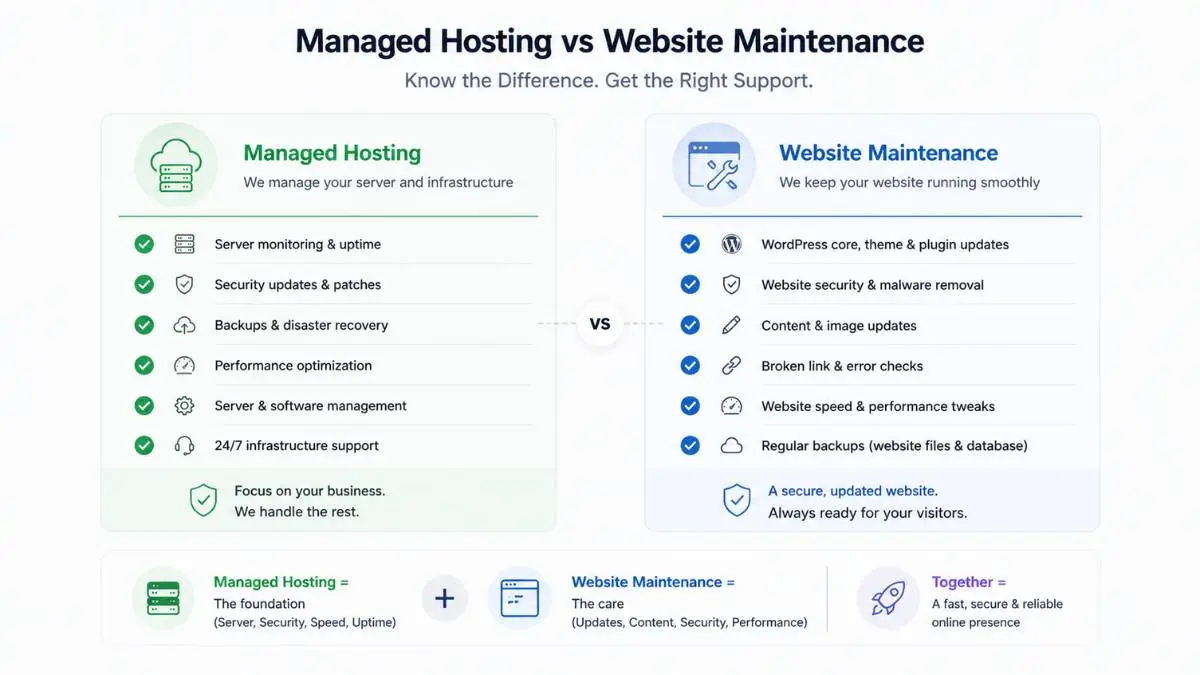
Managed Hosting
The server layer
- ✓ Server stays online
- ✓ OS and PHP stay updated
- ✓ Backups run automatically
- ✓ Firewalls block threats
- ✓ SSL stays valid
- ✓ Resources are monitored
App Maintenance
The website layer
- ✓ Plugins stay updated & tested
- ✓ Conflicts get resolved
- ✓ Forms and checkout keep working
- ✓ Database stays clean
- ✓ Malware gets cleaned from files
- ✓ Site stays fast inside
Looking for a managed host that takes more off your plate? Browse our independently ranked Canadian hosting providers to compare what each plan actually includes — from basic shared hosting to fully managed WordPress environments.
Not sure who your current host is? Use the free Is It Hosted in Canada? tool to find out instantly.
Related Reading
If your host says you are hitting resource limits, that is often a hosting issue. Start with our guide on fixing shared hosting resource limits. If performance problems persist after optimization, consider moving to a VPS.
Frequently Asked Questions
Find a Canadian Host That Fits Your Needs
Browse independently ranked Canadian hosting providers — compare what each managed plan actually includes, from server basics to WordPress-specific support.