
If you've ever wondered is my website hosted in Canada? and weren't 100% sure of the answer, you're in good company. I've talked to small business owners who paid for "Canadian hosting" for years, only to find out their site was actually sitting on a server in Texas or Dublin.
The hosting company's marketing said one thing. The IP told a different story.
Where your site physically lives matters more than the maple leaf on your hosting company's logo. It affects how fast your pages load for Canadian visitors, whether you're aligned with Canadian privacy laws like PIPEDA, and even how Google ranks you for local Canadian searches.
In this guide I'll show you the four methods I use to verify any website's hosting location in under two minutes, no technical background needed. Then the gotchas (looking at you, Cloudflare) that trip most people up.
Why Hosting Location Matters
Three reasons keep coming up in conversations with site owners:
Speed for Canadian Visitors
Every kilometre between your server and your user adds milliseconds. The math is simple:
- Toronto to Ottawa on Canadian hosting: under 50ms
- Toronto to a Virginia server: 60 to 90ms
- Toronto to Frankfurt: closer to 120ms before the page even starts rendering
Google has been clear that page speed is a ranking factor, and mobile users feel slow sites fastest.
Privacy and Data Residency
PIPEDA doesn't strictly require Canadian hosting, but cross-border data adds compliance overhead:
- Disclosure obligations about where data is processed
- Contractual safeguards with foreign providers
- Subprocessor management for anyone touching the data
- Quebec's Law 25 imposes additional rules for Quebec residents
Hosting in Canada doesn't eliminate compliance work, but it simplifies the story considerably.
Local SEO Signals
Google uses server location as one input when ranking sites for geo-specific queries. It's not the biggest factor, but combined with a .ca domain and Canadian-targeted content, it adds up.
So is your site actually hosted where you think it is? Let's find out.
The Fast Way: Use a Hosting Checker
The quickest method is a free tool that does all the lookups for you. I built one for HostFinder.ca specifically because most other options online either show stale data or get fooled by CDNs.
Drop any domain into the checker below. It shows you the IP address, the hosting provider, the data centre's physical location, and a clear answer on whether the site is hosted on Canadian soil.
Drop in any domain. We'll show you the IP, hosting provider, data centre location, and whether the site is actually hosted on Canadian soil. Detects Cloudflare and other CDNs that hide the real origin.
If you want to understand how the answer is determined rather than just trust the tool, here's what's happening under the hood.
How to Check Where a Website Is Hosted (Manually)
You can verify any website's hosting location manually using tools already on your computer. No software to install. Here's the order I do them in.
Step 1: Ping the Domain to Get the IP
Open Terminal (Mac/Linux) or Command Prompt (Windows) and type:
ping hostfinder.ca
You'll see an IP address in the response, something like 162.244.83.21. That's the public IP serving the website. Copy it down. On its own the IP doesn't tell you the country, but it's the foundation for every other step.
Step 2: Run a WHOIS or RDAP Lookup
WHOIS records tell you who owns the IP address and what region it was assigned to. RDAP is the modern replacement, but most lookup tools handle both transparently.
The free one I trust most is the HostFinder WHOIS & RDAP tool. For IP addresses specifically, ARIN is the source of truth for North America, and any decent lookup tool pulls from it.
What to look for in the results:
Country: CA= Canadian-assigned IP block, good signCountry: US= US-based, regardless of marketingCountry: DE,GB, anything else = not Canadian-hosted
Reality check: the country in WHOIS is where the IP block was allocated, not always where the server lives right now. Big providers shuffle IPs between data centres. Use this as a strong signal, then verify with geolocation.
Step 3: Check the IP Geolocation
WHOIS tells you allocation. IP geolocation tells you where the server is physically running right now. These usually agree, but not always.
Free tools I use for this:
- ipinfo.io — clean web interface, includes ASN and organization
- db-ip.com — city-level accuracy, free lookups without signup
- ipgeolocation.io — useful for cross-referencing the other two
Paste in the IP from step 1. You're looking for city-level data. "Toronto, ON, Canada" means confirmed. "Ashburn, Virginia" means your site is on AWS in the US, no matter what the sales page promised.
Step 4: Verify with Traceroute (the Truth-Teller)
Ping and WHOIS can be fooled by CDNs and front-end proxies. Traceroute is harder to fool because it shows the actual network path your request takes to reach the server.
traceroute hostfinder.ca   # Mac / Linux
tracert hostfinder.ca      # Windows
You'll get a list of every network hop between you and the destination. Look at the last few hops. The hostnames often reveal the data centre directly:
*.tor1.cologix.net— Cologix Toronto, confirmed Canadian*.mtl.beanfield.com— Montreal, Beanfield's network*.yvr.peer1.net— Vancouver, Peer 1*.ashburn.aws.com— Amazon Virginia, not Canadian*.fra.hetzner.com— Hetzner Frankfurt, definitely not Canadian
Common Gotchas That Fool Most Checks
A few things will throw off your investigation if you're not watching for them.
How to Tell If a Website Uses Cloudflare
Cloudflare is the biggest source of false positives in hosting lookups. It's also the easiest gotcha to detect once you know what to look for.
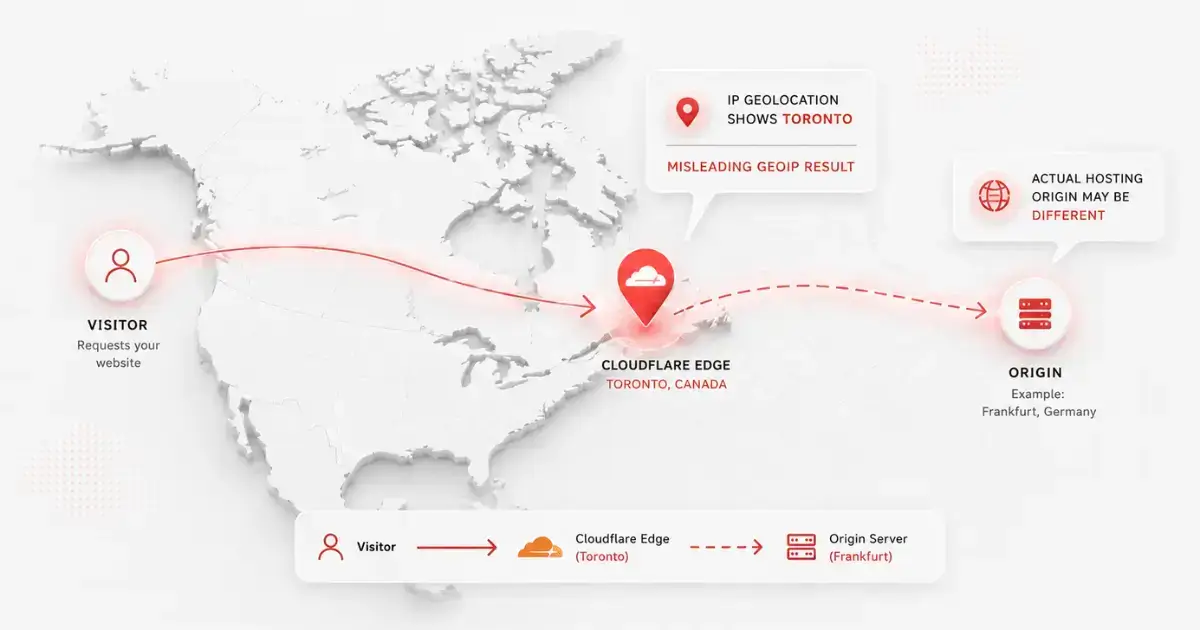
Telltale signs a site is sitting behind Cloudflare:
- The resolved IP starts with
104.,172., or another Cloudflare range - WHOIS shows the IP owner as Cloudflare Inc.
- The site's nameservers end in
.ns.cloudflare.com - The geolocation result changes depending on where you are checking from
Why this matters: A Cloudflare IP geolocates to whichever PoP is closest to you. So a US-hosted site checked from Toronto can show up as "Toronto" in basic lookup tools. To get past Cloudflare, you need access to the origin DNS records or specialty tools that surface the origin server through historical DNS data.
Does a .ca Domain Mean Canadian Hosting?
This is one of the most common assumptions, and it's wrong.
A .ca domain has nothing to do with where your website lives. The two are completely separate:
- Domain registration: tells the world "this address belongs to a Canadian person or company" (via CIRA's Canadian Presence Requirements)
- Web hosting: tells the internet where the server actually is
You can have a .ca domain pointing to a server in Texas. You can have a .com domain pointing to a server in Toronto. The domain extension is irrelevant to where your files are stored. The only way to know is to verify the IP location yourself.
What to Do If Your Site Isn't Hosted in Canada
If you just ran the checks and realized your site is sitting on a server in Texas, you've got two options.
Option A: Stay Put and Add a CDN
This works if:
- You don't collect personal data from Canadian users
- Canadian visitors aren't your primary audience
- You aren't subject to PIPEDA or Quebec Law 25 obligations
The fix is performance-focused. Add a CDN with Canadian PoPs (Cloudflare, BunnyCDN, and Fastly all have them). Not free, but cheaper than migrating.
Option B: Migrate to a Canadian Host
This is almost always the better long-term call for Canadian businesses with Canadian customers. You get:
- Lower latency for the audience that actually buys from you
- Simpler compliance story for PIPEDA and provincial privacy laws
- Billing in CAD instead of fluctuating USD
- Confidence about where your data physically lives
The migration itself is less scary than it sounds. Most Canadian hosts offer free site migration as part of onboarding. They handle the file transfer, database move, and DNS swap. The whole process typically takes 24-48 hours with minimal downtime.
Best Canadian Hosts for Switching
I review every host on the HostFinder directory personally, including verifying the physical office address and confirming where their data centres are located. Here are the three to start with, depending on what you need.
Based in Victoria, BC. 100% Canadian-owned since 2004. One of the few hosts where the entire support team is also located in Canada. Plans from $7.50 CAD/month, free .ca domain included.
Headquartered in Laval. Runs its own infrastructure (no AWS reseller games). Native French and English support. Directly accredited as a domain registrar, so you cut out the middleman.
Montreal-based, in business since 2003. Data centres in Vancouver and Montreal. Bilingual 24/7 support. Plans from $3.89 CAD/month, hard to beat for genuinely-Canadian infrastructure.
The Bottom Line
Verifying where your site is hosted takes about two minutes with the right tools. Either drop your domain into the HostFinder Host Checker for an instant answer, or run through ping, WHOIS, geolocation, and traceroute yourself if you want to understand exactly what's happening.
If you discover your site isn't where you thought it was, the migration to a proper Canadian host is more straightforward than most people expect. For Canadian businesses serving Canadian customers, the speed and compliance benefits compound over time.