
When to Move Your Database
From Shared Hosting to VPS
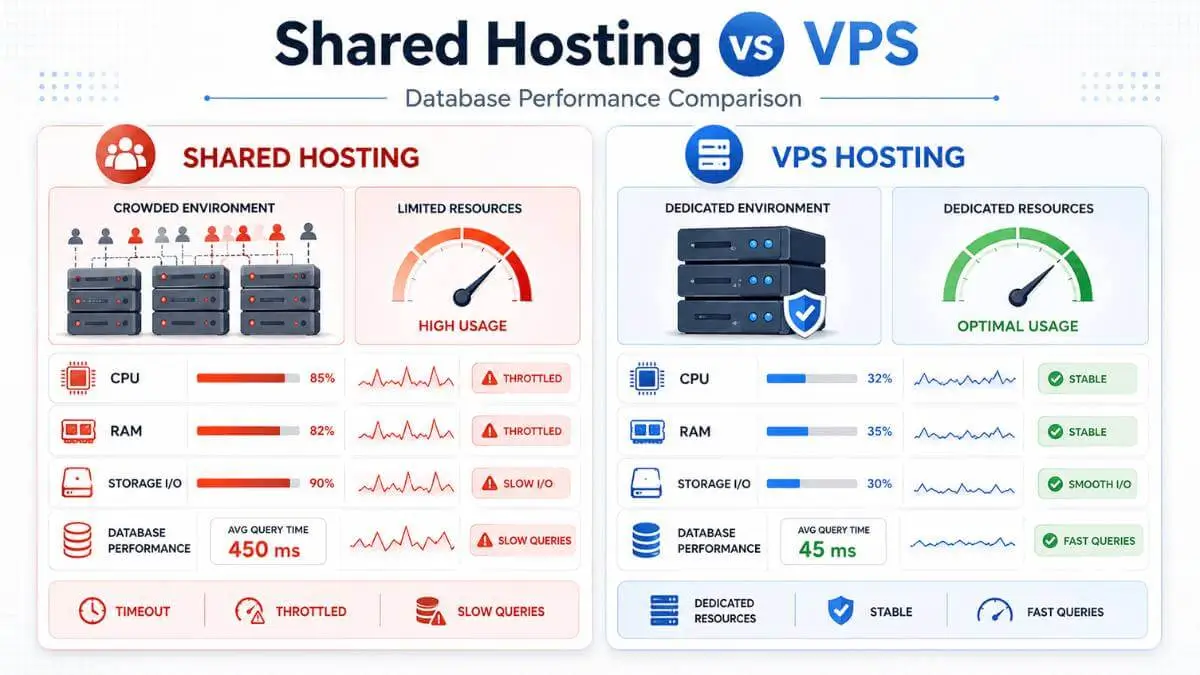
I've seen this happen more times than I can count.
A business starts with shared hosting because it is affordable, simple, and good enough at the beginning. The website loads fine. The contact forms work. The admin dashboard is usable. Maybe the site is running WordPress, WooCommerce, a booking system, a membership area, or a custom web app.
Then, little by little, things change.
Pages take longer to load. The checkout page hangs. The admin area feels sticky. Customers say the site "froze." Your developer says the database is timing out. Your hosting company says your account is using too many resources.
This is usually the moment when shared hosting starts showing its limits. The issue is not always your website design, your plugins, or bad code. Sometimes the real problem is that your database has outgrown the shared environment.
And when your database is the engine behind your website, slow database performance can make the entire business feel broken.
Already Getting Resource Warnings?
If your host has already suspended or throttled your site for high resource usage, start with our guide on fixing shared hosting resource limits — then come back here to decide whether it is time to move up.
What Happens When a Shared Server Can't Keep Up
A database is where your website stores and retrieves information. For a basic blog, that might mean posts, pages, users, and settings. For a WooCommerce store, it also includes products, orders, customers, coupons, inventory, carts, and payment records. For a membership site, it may include subscriptions, user permissions, private content, and activity logs.
Every time someone visits your website, the site may need to ask the database a question. That question is called a database query — just a request for information.
What Database Queries Look Like in Plain English
On a small site, these requests happen quickly. But as your site grows, the database gets busier. More visitors means more questions. More products means more data to search. More plugins means more background activity. More orders means more records to write.
Shared hosting can handle some of this — but only up to a point.
🍳 The Restaurant Kitchen Analogy
Shared hosting is like a crowded restaurant kitchen. Your website is one chef, but you share the stove, fridge, counter space, and staff with dozens of other chefs. When everyone is quiet, it works. When dinner rush hits, everything slows down. A VPS is like having your own private kitchen — you still need to manage it, but you are no longer fighting hundreds of other sites for the same resources.
The Core Problem: Continuous Database Operations
A static website — mostly basic pages, images, and text — is easy to host. The server simply sends files to the visitor.
But a database-heavy website is different. It is always working. A WooCommerce store checks products, carts, sessions, orders, taxes, coupons, shipping rules, and stock. A booking website checks availability. A membership site checks permissions. A directory searches listings. A forum loads comments, users, posts, and notifications.
These are continuous database operations. That means the database is being read from and written to all day — not just sitting quietly waiting.
Warning Symptoms — The Database Is Struggling
Fine at midnight, slow in the afternoon
Your site works great during off-hours but bogs down when traffic picks up. The database cannot handle concurrent queries during peak load.
Homepage loads, checkout struggles
Static or cached pages feel snappy, but dynamic pages that hit the database — checkout, search, filters, account dashboards — grind to a halt.
Admin dashboard takes 10+ seconds
The WordPress admin is mostly dynamic and cannot be cached the same way the front end can. A slow wp-admin is an early sign the database is under pressure.
Forms and buttons just… stop responding
Customers click "submit" or "add to cart" and nothing happens. The front end looks fine, but the backend is choking on the database write.
At first, these problems feel invisible. Then they start costing you money. The front end of the site might look fine, but the backend is choking — and your visitors feel it in every slow page load, every abandoned cart, and every form that hangs.
What Is Latency — and Why Should You Care?
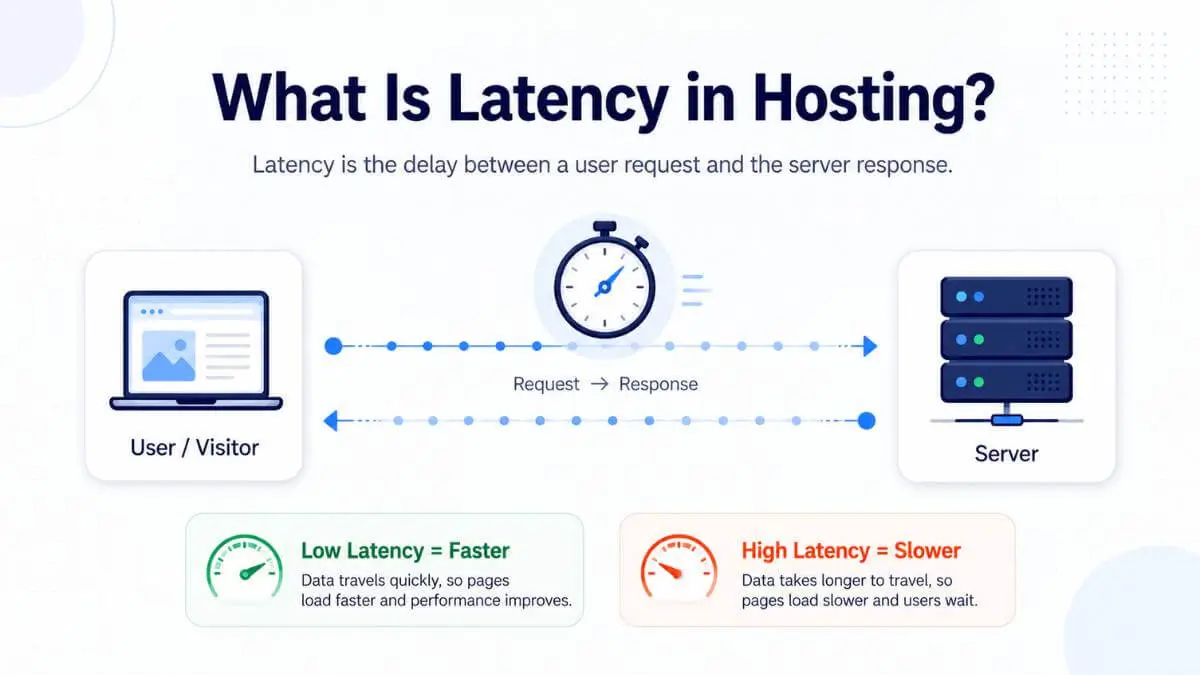
Latency is a fancy word for delay. If you click a button and the server takes too long to respond, that delay is latency. On a website, it happens when the browser asks the server for something and the server takes too long to answer.
With database-heavy sites, the delay usually comes from slow database queries, overloaded CPU, memory limits, disk I/O limits, or too many active connections. The user does not care which one it is. They just know the site feels slow.
☕ The Coffee Shop Version
Low latency: The barista takes your order right away and hands you the coffee quickly. High latency: There are 30 people in line, the espresso machine is slow, and the cashier keeps disappearing into the back room. Nothing is technically "broken" — but the wait is painful.
Slow checkout
Feels risky to buyers
Slow booking
Feels broken
Slow dashboard
Feels unprofessional
Slow search
People leave
Backend Timeouts: The Warning Sign You Should Not Ignore
A backend timeout happens when the server takes too long to complete a task and eventually gives up. One timeout could be a temporary issue. Repeated timeouts are a pattern — and they are smoke from the engine.
500 Error
Internal server failure
502 Bad Gateway
Server communication error
503 Unavailable
Server overloaded
504 Timeout
Server gave up waiting
"Error establishing a database connection"
White screen / frozen page
If your database regularly cannot complete tasks within the allowed time, shared hosting may no longer be the right environment. According to Google's Core Web Vitals framework, server response time directly affects how Google evaluates your site's user experience — and your rankings.
Why Shared Hosting Struggles With Databases
Shared hosting is built for affordability, not heavy database performance on shared hosting. The hosting company divides one server among many accounts, each with limited CPU, memory, disk speed, and database access. When your database needs more power, the shared environment may not have enough room.
1. Too Many Database Queries
Every plugin, theme feature, and user action creates queries
One query is fine. Ten are fine. But when every page load triggers hundreds of queries — product lookups, cart checks, session validations, filter calculations — the database gets overwhelmed. Now imagine 50 visitors triggering those same queries at once.
📁 Filing cabinet analogy: A simple site says "grab this one folder." A bloated site says "grab this folder, check 18 others, sort by date, compare to another drawer, then update three forms." Now imagine 50 people asking that at once.
2. Slow or Unoptimized Queries
Not all queries are equal — some are expensive
A good query is like asking a librarian for a book by ISBN — fast and precise. A bad query is like saying "search every shelf, open every book, and find anything that mentions this phrase." On shared hosting, slow database queries can drag the entire site down.
Usual offenders:
3. Limited Memory
Databases and PHP both compete for tight RAM limits
Shared hosting usually has strict memory limits. When your site needs more than allowed, processes slow down or fail. This is common with large product catalogs, complex page builders, big imports, heavy plugins, and too many logged-in users. Memory is like desk space. If you only have a tiny desk, you can work on one or two documents. If someone dumps 500 folders on it, nothing gets done efficiently.
4. Disk I/O Limits
How fast the server can read and write data
Databases constantly read and write — product data, orders, sessions, settings, logs. Even if your CPU is okay, the database can feel slow because the server is not reading and writing fast enough. According to MariaDB's optimization guide, disk I/O is often the primary bottleneck for database-heavy workloads.
Especially noticeable during:
5. Too Many Concurrent Users
Active users, not just daily pageviews
Concurrent users are people using the site at the same time — not just visitors in one day. Ten people reading cached blog posts is easy. Ten people searching products, adding to carts, logging in, and checking out is much heavier. Shared hosting often struggles when many users trigger dynamic database actions simultaneously.
Database Bottleneck Severity on Shared Hosting
Relative impact based on common shared hosting complaint patterns. Most sites experience multiple bottlenecks simultaneously.
Signs You Should Move to VPS Hosting
You do not need to upgrade just because your site has traffic. You should upgrade when the site's workload has outgrown the environment. Here are the signs I look for.
Your Admin Dashboard Is Painfully Slow
If the public site is cached, visitors may see decent speeds — but wp-admin is mostly dynamic. A slow admin area is often the first sign your database is struggling.
Checkout or Forms Keep Hanging
If people cannot place orders, submit leads, or book appointments, the hosting issue is directly costing money. This is a serious business problem.
Your Host Keeps Sending Resource Warnings
One warning may be fixable. Repeated CPU, memory, EP, or I/O warnings usually mean your site is either poorly optimized or too active for the plan.
You Have Already Optimized Everything
Caching is on. Images are compressed. Bad plugins are gone. PHP is updated. Database is clean. Bots are blocked. Backups are scheduled off-peak. And the site still hits limits. That is your signal.
Your Database Is Growing Fast
A growing database usually means your business is active — and that is a good thing. But shared hosting is not designed for large, constantly changing databases.
You May Need VPS Database Hosting If You Have:
Not sure where your site is even hosted right now? Use the free Is It Hosted in Canada? tool to see your current hosting provider and server location at a glance.
What a VPS Actually Changes
A VPS — Virtual Private Server — gives your site a more isolated server environment. You are still on physical hardware, but your account gets dedicated resources inside its own virtual space. You are no longer packed into the same shared setup with hundreds of unrelated sites.
A VPS will not magically fix bad code. A slow database query is still a slow query. A broken plugin is still broken. But a VPS gives you more breathing room, more tuning options, and lets your developer configure the stack around your site — instead of forcing your site to live inside a generic shared hosting box.
What You Gain With a VPS

Managed VPS vs Unmanaged VPS
This part matters more than most people realize.
Managed VPS
The host handles server setup, updates, security patches, backups, firewall rules, database tuning, and troubleshooting. You focus on your website and business.
Best for:
- ✓ Most business owners
- ✓ Non-technical teams
- ✓ Sites that cannot afford downtime
Unmanaged VPS
You or your developer handle everything — server setup, security, updates, database config, and troubleshooting. More powerful, but requires expertise.
Best for:
- ✓ Developers and sysadmins
- ✓ Teams with technical support
- ✓ Custom server configurations
⚠ Important
A badly managed VPS can be worse than good shared hosting. If your website is important to your business, do not move to the cheapest unmanaged VPS just because it looks powerful on paper.
What to Do Before You Upgrade
Before moving your database from shared hosting to VPS, run through this quick audit. If most answers are "no," optimize first — you may buy yourself more time. But if everything is clean and the site still struggles, upgrading becomes the practical move.
Pre-Upgrade Checklist
- Site is fully updated (WordPress, PHP, plugins, themes)
- Unused plugins are removed — not just deactivated
- Page caching is enabled and working
- Images are compressed and properly sized
- No signs of malware or suspicious code
- Backups are scheduled during off-peak hours
- Bot traffic is filtered (Cloudflare or similar)
- Slow database queries have been identified
- Database is cleaned of old revisions, transients, and junk
- Error logs have been reviewed for patterns
The Business Case for Moving
A lot of business owners hesitate because a VPS costs more. I understand that. But the real question is not "Is VPS more expensive than shared hosting?" — the better question is: "How much does slow hosting cost the business?"
If a slow checkout loses sales, the cheap plan is not cheap. If backend timeouts waste staff time, the cheap plan is not cheap. If customers lose trust, the cheap plan is not cheap. If your developer spends hours fighting shared hosting limits every month, the cheap plan is not cheap.
At a certain point, better hosting is not a technical upgrade. It is an operational decision.
Ready to compare your options? Browse our independently ranked Canadian hosting providers — including VPS and managed WordPress options — to find a plan that matches where your business is going.
page takes over 3 seconds
a site with bad performance
retailers to slow page loads
Sources: Think with Google, Google Web Vitals
Frequently Asked Questions
Find a Canadian VPS Host That Fits Your Business
Browse independently ranked Canadian hosting providers — including VPS, managed WordPress, and cloud options — sorted by real-world performance, privacy, and value.