
How Hosting Architecture Determines
Your Core Web Vitals
You have compressed your images. You have deferred your JavaScript. You have minified your CSS. You removed unused plugins, cleaned up your theme, lazy-loaded your media, and maybe even installed a caching plugin.
But your Core Web Vitals are still failing.
Sometimes the problem sits deeper than the front end. You may be trying to build a race car on a dirt road.
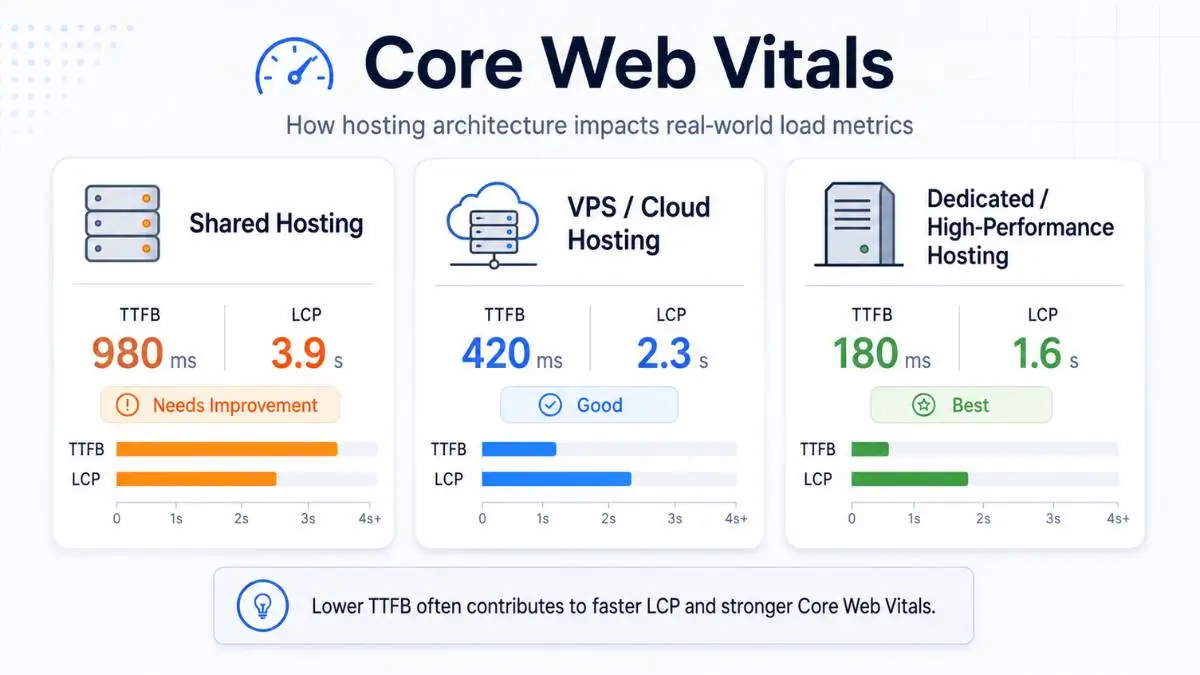
Front-end optimization matters — but it is only half the battle. Your hosting architecture sets the baseline for how fast your site can respond in the first place. If the server is slow, overloaded, far from users, or stuck behind shared resource limits, your Core Web Vitals will always have a ceiling.
This matters most when looking at two metrics: Time to First Byte (TTFB) and Largest Contentful Paint (LCP).
LCP Target
Google's "good" threshold
TTFB Target
Google's recommended ceiling
The Uncomfortable Truth
You cannot consistently achieve excellent LCP if your hosting architecture gives you slow or unpredictable TTFB. Google's own TTFB guidance notes that TTFB precedes user-centric metrics like FCP and LCP — fast server response is foundational.
First, What Are TTFB and LCP?
Time to First Byte (TTFB)
How long before the server starts replying?
If someone visits your homepage and the server takes 1.2 seconds before sending anything back, your TTFB is already 1.2 seconds. That delay happens before the browser can even start rendering.
TTFB is affected by:
Largest Contentful Paint (LCP)
When does the main content appear?
LCP measures when the largest visible content element — a hero image, large heading, featured banner, or product image — appears in the viewport. Google's recommended threshold is 2.5 seconds or less at the 75th percentile.
LCP elements are usually:
Here Is the Catch
If your TTFB is 1.5 seconds, your LCP cannot happen before 1.5 seconds — the browser has not received the page yet. That means a slow server eats directly into your 2.5-second LCP budget, leaving only 1 second for HTML parsing, CSS, JavaScript, image discovery, download, and rendering. That is a very tight window.
Architecture 1: Shared Hosting
Shared hosting is the most common starting point — cheap, simple, and easy. Many websites start here. The basic setup: many websites share the same physical server, splitting CPU, RAM, disk I/O, database resources, and web server processes.
This works fine when traffic is low and every site behaves. But shared hosting has one major performance problem: variance.
🏠 The Noisy Neighbor Effect
Your site may be fast one minute and slow the next — not because your code changed, but because the environment changed. Another site on the server got a traffic spike, ran a heavy backup, got attacked by bots, or triggered a resource-heavy plugin. Google does not care that your site was only slow "sometimes." Field data captures all of it.
Shared Hosting TTFB Pattern — Typical Real-World Variance
The inconsistency is the problem. A single good test does not mean the architecture is healthy.
If TTFB is already 1.2 seconds, a good LCP under 2.5 seconds becomes possible but fragile. If TTFB jumps to 1.8 seconds, the page has only 700ms left to stay in the "good" range. That is why front-end fixes alone often fail on shared hosting — you shrink the hero image, but the server response jumps by 900ms during traffic and your LCP takes the hit anyway.
Already dealing with resource limits? Our guide on fixing shared hosting resource violations covers the immediate steps.
Architecture 2: VPS & Dedicated Servers
A VPS gives your site a more isolated environment — your CPU and RAM are clearly allocated, so you are no longer sharing an open pool with hundreds of accounts. A dedicated server goes further: the entire machine is yours.
For performance, the biggest improvement is usually consistency. Your database can be tuned, PHP workers configured, object caching added, and server-level caching controlled.
VPS TTFB Pattern — Local Users Near the Data Centre
A predictable 150ms TTFB is a different world from shared hosting that swings between 700ms and 2 seconds.
The Geographic Limitation
VPS and dedicated hosting still have a physical limitation: distance. If your server is in Toronto and your user is in Sydney, the request has to travel much farther. Even with a powerful server, distance adds delay. This is not a server power issue — it is physics.
For local users, VPS hosting makes strong LCP scores much easier — if TTFB is 100ms, the browser has nearly the full 2.5-second budget for rendering. For global users, LCP can still degrade. VPS solves the shared resource problem. It does not fully solve the geography problem.
Considering a VPS? Our guide on when to move from shared hosting to VPS covers the decision in detail.
Architecture 3: Edge Computing & Global CDNs
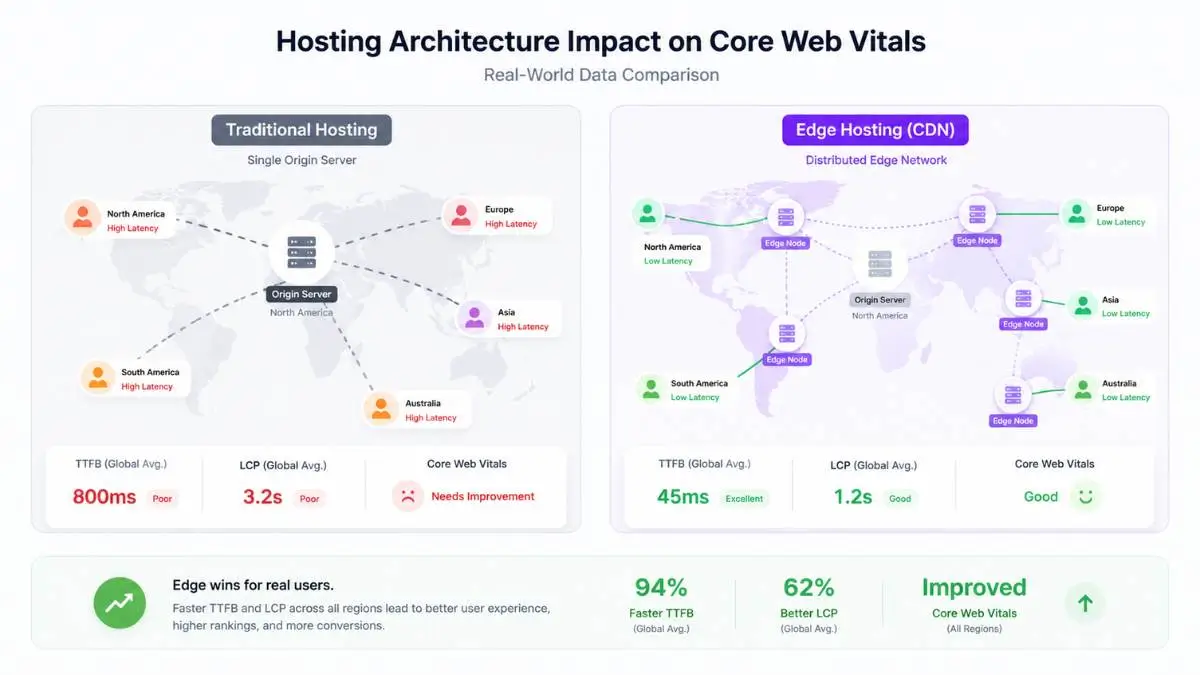
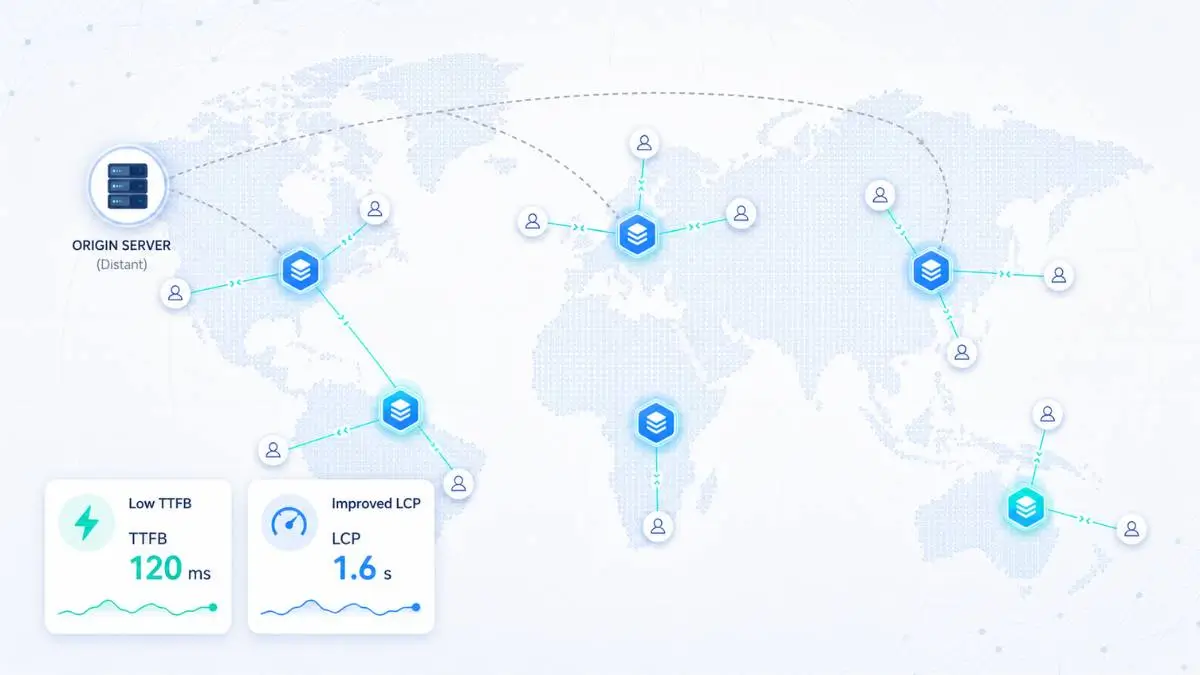
Edge architecture changes the performance model entirely. Instead of serving every user from one origin server, an edge network serves content from locations closer to users.
A traditional CDN caches static assets — images, CSS, JavaScript, fonts. More advanced edge setups can also cache HTML or run server-side code at the edge. The goal is simple: move the response closer to the person requesting it.
Edge / CDN TTFB Pattern — Global Users
Idealized ranges for cacheable pages. Shared hosting fights for resources. VPS improves consistency. Edge attacks distance itself.
When TTFB is no longer the bottleneck, LCP becomes mostly a front-end problem again — and that is exactly what you want. If your server response is 40ms and your LCP is still 3.8 seconds, you know the issue is in the page itself: hero image too large, LCP image discovered too late, render-blocking CSS, too much JavaScript, or poor font loading.
Edge hosting gives you a clean baseline. It does not guarantee good LCP, but it removes one of the biggest obstacles.
⚠ What Hosting Cannot Fix
Better hosting will not fix everything. You can put a bloated site on a premium edge network and still fail Core Web Vitals.
Empirical Comparison: Architecture vs Performance
The following table uses practical field-observation ranges. These are not universal — every site, stack, CDN, region, and cache policy is different. But they show the architectural pattern.
The key takeaway is not just that better architecture lowers TTFB. The bigger takeaway is that better architecture reduces variance. That matters because users visit from different countries, networks, devices, and traffic conditions. A site that is sometimes fast and sometimes slow is still a problem.
The Right Mental Model
Hosting architecture sets the floor. Front-end optimization determines how close you get to the ceiling. You need both. Google's Web Vitals guidance identifies LCP as loading, INP as responsiveness, and CLS as visual stability. Hosting helps LCP when the server is the bottleneck. INP and CLS are mostly front-end concerns.
How to Diagnose Whether Hosting Is the Problem
Before upgrading blindly, test properly. Start by separating server delay from front-end delay.
Practical Architecture Recommendations
For Small Local Websites
Good shared hosting may be enough — if the site is mostly static, uses caching, and serves one region. You may not need a VPS or edge architecture yet.
For Growing WordPress / WooCommerce Sites
Shared hosting often becomes the weak point. Move to a VPS or managed cloud when you need consistent TTFB, better database performance, more PHP workers, server-level caching, and less noisy-neighbor risk.
- Consistent TTFB under 200ms
- Better database and PHP worker performance
- Server-level + object caching
- Control over backups and cron jobs
For Global or High-Traffic Sites
Add edge/CDN architecture when you need fast global performance, lower TTFB across regions, and protection from traffic spikes. For best results: strong origin server + CDN in front.
- Fast TTFB for international visitors
- Better cache distribution worldwide
- Traffic spike protection
- Faster LCP for users far from the origin
Ready to compare options? Browse our independently ranked Canadian hosting providers to find plans that match your site's architecture needs — from shared hosting through VPS to managed cloud and CDN-backed options.
Frequently Asked Questions
Find a Canadian Host That Won't Bottleneck Your Vitals
Browse independently ranked Canadian hosting providers — sorted by real-world performance, privacy, and value. Find the architecture that matches your traffic, your audience, and your performance goals.