
CDNs and Server-Side Caching
The No-Code Speed Combo
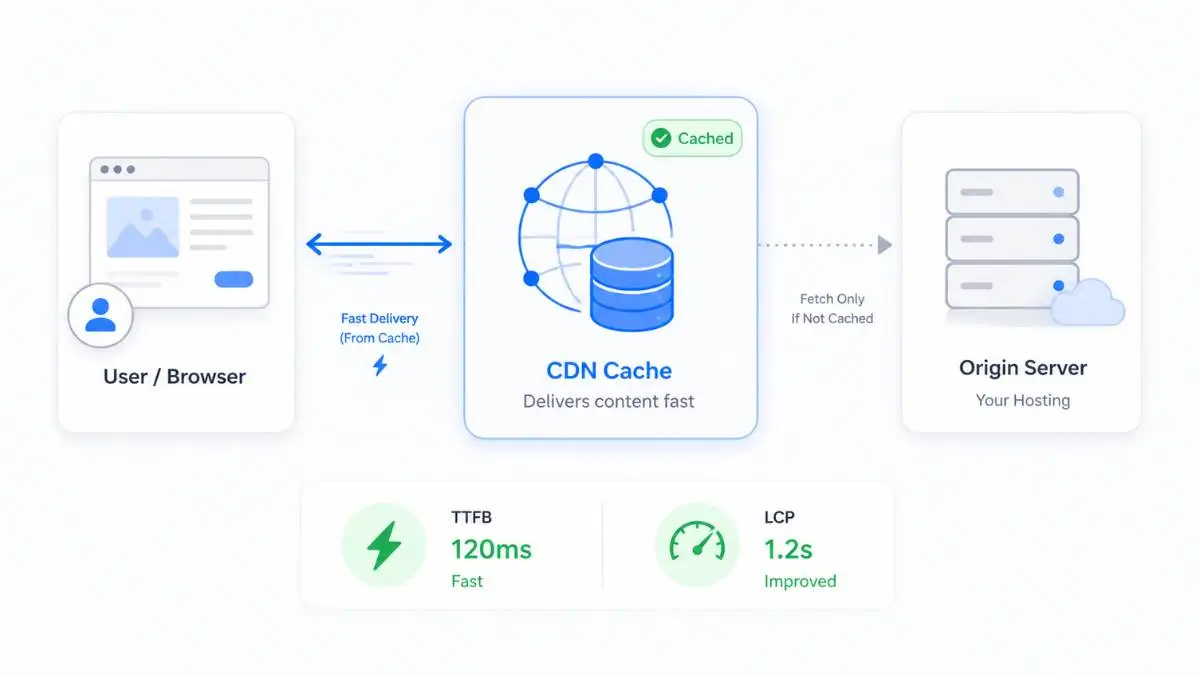
You do not have long to make a first impression. A slow website is not just a technical problem — it is a business problem. Visitors leave. Shoppers abandon carts. Leads disappear. Ad spend gets wasted.
The frustrating part is that many website owners already know their site feels slow, but they hear advice like "optimize your JavaScript" and "reduce render-blocking CSS" — and it feels overwhelming.
The good news is that two of the most powerful website speed improvements do not require you to rewrite anything:
CDN
Solves the distance problem
Server-Side Caching
Solves the repetition problem
Used together, they can make a sluggish website feel dramatically faster — because they reduce the two biggest sources of delay: files traveling too far and the server rebuilding the same pages over and over again.
The Two Basic Problems
Most slow websites have two fundamental issues.
Problem 1: Distance
If your website is hosted in New York and someone visits from Vancouver, London, Sydney, or Tokyo, your files have to travel farther. That physical distance creates delay — even when the internet feels instant, data still moves across networks, routers, cables, and data centres.
Problem 2: Repetition
If your site runs WordPress, WooCommerce, or another CMS, the server often builds pages dynamically — loading PHP, querying a database, assembling the HTML. Doing that once is fine. Doing it for every visitor, every pageview, and every product page is wasteful.
What Is a CDN?
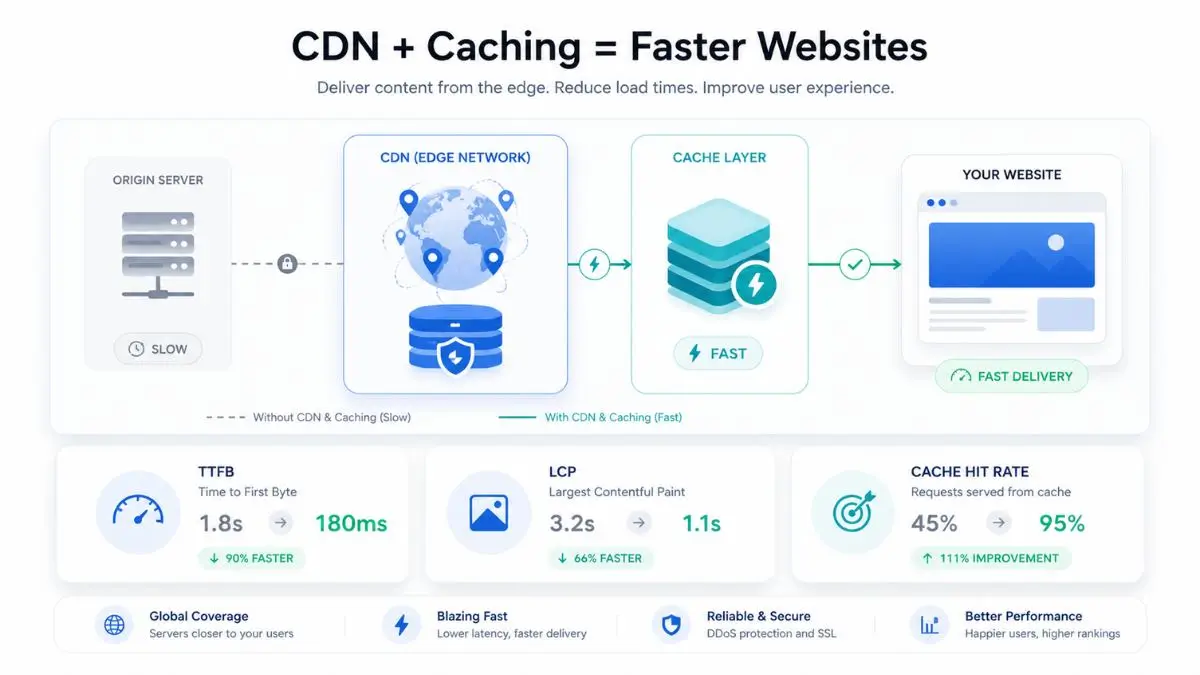
A CDN — Content Delivery Network — is a network of servers spread across different cities and regions. Cloudflare defines a CDN as a geographically distributed group of servers that caches content close to end users.
Instead of every visitor pulling files from your main hosting server, the CDN sends files from a server closer to them.
📦 The Warehouse Analogy
Without a CDN: Every customer order ships from one main factory. With a CDN: Your most common products are already stored in warehouses around the world. Toronto gets served from a Toronto warehouse. London from London. Tokyo from Tokyo. Same product. Shorter delivery distance.
What a CDN Speeds Up — Static Files
What Is Server-Side Caching?
Server-side caching is different from a CDN. A CDN helps with delivery distance. Server-side caching helps with server workload.
Without caching, a CMS like WordPress may need to build a page from scratch every time someone visits — loading PHP, checking plugins, querying the database, pulling content, applying the theme, and sending the finished HTML. Now imagine 500 people visit the same blog post in one hour. Without caching, the server rebuilds that page hundreds of times.
With caching, the server builds the page once, saves a ready-made copy, and hands that copy to every subsequent visitor. Google recommends a TTFB of 0.8 seconds or less, and server-side caching is one of the most effective ways to get there.
🍱 The Meal Prep Analogy
Server-side caching is meal prep for your website. Instead of cooking the same dinner from scratch every night, you cook once, store portions, and reheat them quickly when needed. Instead of saying "Give me a minute, I need to cook this fresh" — the server says "Already prepared. Here you go."
Page Caching
Saves a completed HTML version of a page. Instead of running WordPress for every visitor, the server serves a saved page. Biggest win for blogs, business sites, and content-heavy sites.
Object Caching
Stores repeated database query results using systems like Redis or Memcached. Helpful for dynamic sites — WooCommerce stores, membership sites, directories, and forums.
Reverse Proxy Caching
Sits in front of the web server and serves cached responses before the request reaches the backend. Varnish is a common example used by many managed hosts.
Opcode Caching
Stores compiled PHP code so the server does not need to recompile it every request. OPcache is built into modern PHP. Most good hosts handle this at the server level.
CDN vs Caching: The Simple Difference
Both make your website faster, but they do different jobs. You do not choose one because the other exists. They work best together.
CDN =
Shorter delivery route
Caching =
Less repeated work
Why Combining CDN + Caching Works So Well

When someone clicks your link, the browser needs the HTML document first — then it discovers the images, CSS, JavaScript, and fonts needed to display the page.
If the HTML is slow, the page starts late. If the assets are slow, the page finishes late. Server-side caching improves the start. A CDN improves the finish. Together, they attack the full loading process.
❌ Without Caching or CDN
✅ With Caching + CDN
This combination can commonly cut load times by 50% or more, especially on sites with no prior caching, poor hosting, large images, or visitors far from the origin server. It is not guaranteed for every website — a tiny static site may not see a huge difference. But for most WordPress, WooCommerce, and small business sites, CDN plus caching is the highest-impact speed upgrade available without writing code.
What They Will Not Fix
Both tools are powerful, but neither is magic. It helps to know the boundaries so you set the right expectations.
A CDN Will Not Fix:
Caching Will Not Fix:
Remember
Caching makes repeated page generation faster — it does not make a 5 MB image small. A CDN delivers files faster — it does not fix a struggling WordPress backend. That is why they are partners, not replacements for each other. Already hitting resource limits? Start with our guide on fixing shared hosting resource limits.
Practical No-Code Setup Guide
You do not need to write code to get started. Here is a practical path, step by step.
Check What Your Host Already Provides
Many hosts include caching tools. Do not install five caching plugins at once — that creates conflicts. Start with what your host recommends.
Turn On Page Caching
Page caching gives the biggest immediate gain for most WordPress sites.
LiteSpeed Cache
Free — best on LiteSpeed servers
WP Rocket
Paid — beginner-friendly
W3 Total Cache
Free — advanced controls
WP Super Cache
Free — simple & reliable
⚠ E-commerce warning: Cart, checkout, account, and logged-in pages should not be cached like normal public pages.
Add a CDN
Cloudflare is a common starting point with a free plan. Other options include Bunny.net, Fastly, Amazon CloudFront, KeyCDN, and CDN services built into hosting platforms. Make sure the CDN caches images, CSS, JavaScript, fonts, and static files.
Compress and Resize Images
A CDN delivers images faster, but you should still make images smaller. Use WebP or AVIF, compress properly, resize to actual display dimensions, and lazy-load below-the-fold images. A CDN helps delivery — image optimization reduces the weight being delivered.
Test Before and After
Run a few tests before and after setup. Test from the location where your visitors actually are. Do not rely on one test.
- PageSpeed Insights — load time, LCP, TTFB
- GTmetrix — waterfall view, performance scores
- WebPageTest — multi-location testing
- CDN analytics — cache hit ratio, bandwidth saved
- Mobile performance — always test mobile separately
Common Mistakes to Avoid
Using too many caching plugins
Two caching plugins can fight each other, break layouts, or serve stale content. Use one system.
Caching checkout pages
Cart, checkout, and account pages need personalized real-time data. Always exclude them.
Forgetting to clear cache after changes
Updated your design or published a new page? Clear your cache or visitors see the old version.
Thinking a CDN fixes bad hosting
A CDN reduces pressure on your server but cannot fully hide a terrible origin. If uncached requests are slow, you may still need better hosting.
Ignoring mobile testing
A desktop speed test is not enough. Most performance problems are worse on mobile — slower processors, weaker networks.
Looking for a host that includes caching and CDN integration out of the box? Browse our independently ranked Canadian hosting providers to compare what each plan includes.
Not sure where your site is hosted? Use the free Is It Hosted in Canada? tool to find out.
Frequently Asked Questions
Find a Fast Canadian Host With Built-In Caching
Browse independently ranked Canadian hosting providers — many include server-side caching, CDN integration, and performance tools out of the box.