
Limitations of Free Wildcard SSL Certificates
What Businesses Need to Know
Free SSL certificates changed the web for the better. Years ago, many websites still loaded over plain HTTP — login forms, contact forms, checkout pages, and private user data moved across the internet without proper encryption. Certificate Authorities like Let's Encrypt helped fix that by making HTTPS free, automated, and accessible to almost everyone.
That is a good thing.
But here is the question business owners, IT admins, and developers need to ask: Is a free wildcard SSL certificate the best choice for your whole business infrastructure?
Sometimes, yes. For personal projects, staging environments, small sites, and simple internal tools, free wildcard SSL certificates work very well. But for business-critical websites, customer portals, SaaS platforms, and e-commerce stores, "free" can come with hidden costs — renewal risk, automation dependency, support gaps, no warranty, and weaker business identity signals.
One Certificate, Many Subdomains
A wildcard SSL certificate protects one main domain and all of its first-level subdomains. Instead of buying and managing separate certificates for every subdomain, you use one wildcard certificate to cover them all.
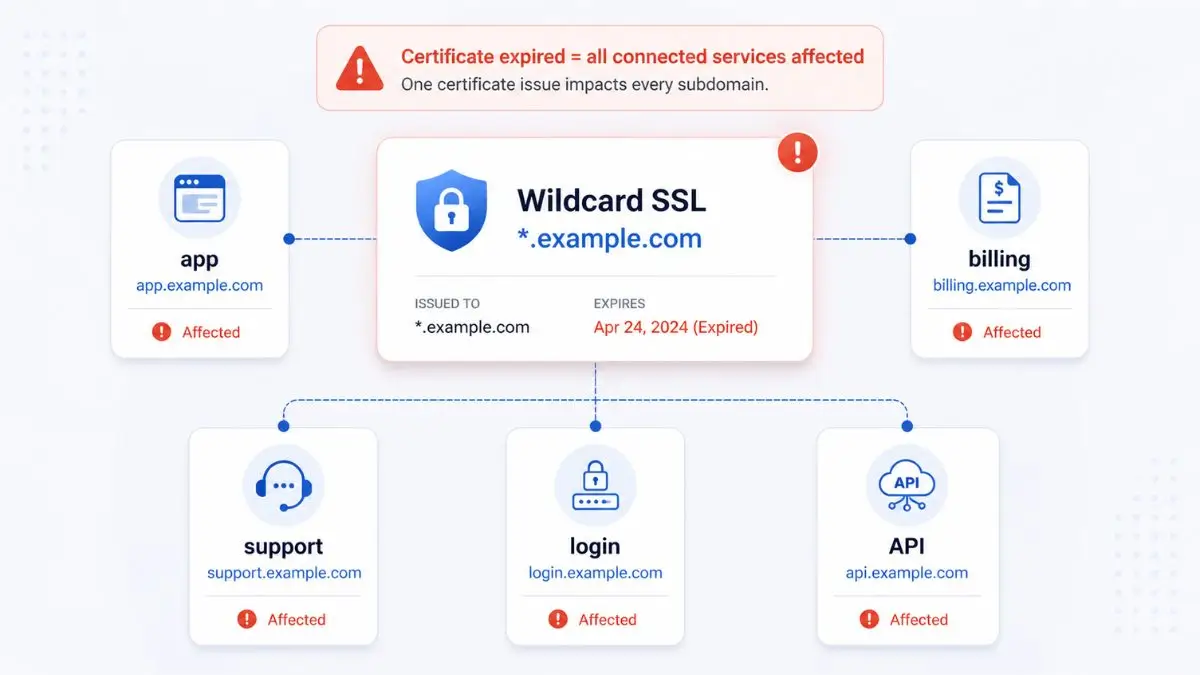
That is convenient — but it also means the certificate becomes more important. If that one wildcard certificate expires, breaks, or fails to renew, it can affect every subdomain using it. That is where the risk starts.
A wildcard certificate for
*.yourcompany.com
Can secure all of these:
To Be Fair
Free wildcard SSL certificates are excellent for many use cases. They encrypt traffic, remove browser "Not Secure" warnings, and make HTTPS accessible to everyone. The problem is not that free SSL is insecure — it is that free SSL shifts more operational responsibility onto you. For a small website, that is fine. For business infrastructure, that responsibility matters.
Limitation #1: The 90-Day Expiration Cycle
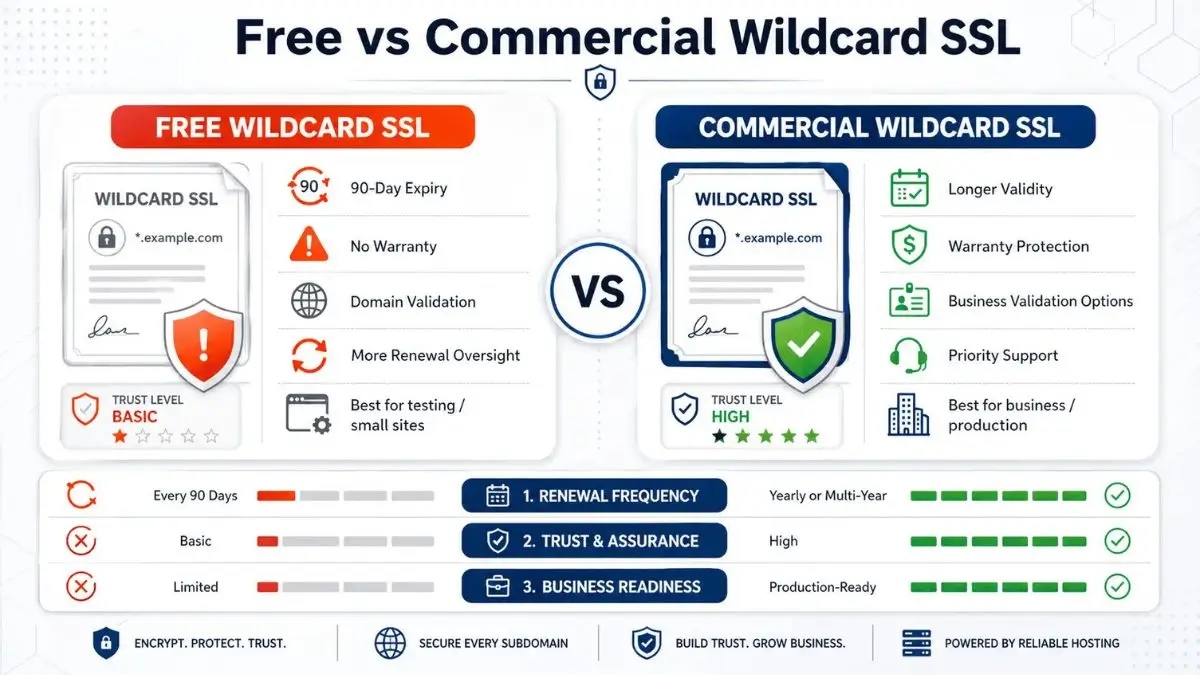
The biggest limitation of free wildcard SSL certificates is the short renewal cycle. Free certificates commonly expire every 90 days — roughly four renewals per year, per certificate. Let's Encrypt confirms that its certificates are valid for 90 days and recommends renewing every 60 days.
For one simple website, this may not sound like a big deal. For a business with several domains, subdomains, servers, load balancers, and third-party integrations, it becomes certificate management work.
And with wildcard certificates, renewal is more sensitive because validation usually depends on DNS-based verification.
Your Free Wildcard Renewal Depends On:
The Real Risk: Automation Failure
Free wildcard SSL certificates depend on automation. That is not a problem by itself — the entire SSL/TLS industry is moving toward shorter lifespans. DigiCert notes that CA/Browser Forum rules reduce public TLS certificate lifetimes to 200 days in 2026, then 100 days in 2027, and 47 days by 2029.
But automation has to be monitored. A renewal script can fail silently — and when a wildcard certificate fails, the damage spreads across every subdomain at once.
How Automation Silently Breaks — Common Failure Points
DNS provider changes its API or deprecates endpoints
API token expires and no one notices
Server firewall blocks the renewal request
Cron job silently stops running after a server update
Control panel update changes file paths or hooks
A staff member leaves and no one understands the renewal process
Server migration breaks the renewal setup entirely
The Reputational Cost
I have seen this happen: a company sets up free wildcard SSL, everything works for months, then one morning several subdomains show certificate errors. The site is not hacked. The server is not offline. The SSL simply expired because automation silently failed. Users see a browser warning, hesitate, and leave. That reputational damage can cost more than the certificate ever would have.
Limitation #2: No Warranty Protection
This is one of the biggest differences between free and commercial SSL certificates. A free SSL certificate comes as-is — you get encryption, but no meaningful financial protection if something goes wrong with certificate issuance or CA-related errors.
For a personal blog, that may not matter. For an e-commerce site, SaaS dashboard, healthcare portal, or financial platform, it can matter a lot.
Free Wildcard SSL
Warranty coverage
Commercial Wildcard SSL (OV)
Warranty coverage (varies by provider)
Commercial SSL certificates often include warranty protection depending on the product. Sectigo lists warranty coverage on its Wildcard OV SSL products. That warranty is not the same as general cyber insurance — it does not cover every breach or mistake. But it does create a commercial safety net around specific certificate-related failures.
The simple version: a free SSL certificate gives you encryption. A commercial SSL certificate can give you encryption plus a layer of financial backing and vendor accountability.
Limitation #3: Domain Validation Only — No Business Identity
Free SSL certificates are typically Domain Validation (DV) certificates. DV proves that someone controls the domain — but it does not prove the website belongs to a real, verified business.
This is one reason phishing sites can still show a padlock. The padlock means the connection is encrypted. It does not automatically mean the company behind the website is trustworthy. That is a point many business owners miss.
Domain Validation (DV)
Proves someone controls the domain. Does not verify business identity, legal existence, or organization details.
What users see:
Padlock + "Connection is secure" — nothing about the company
Organization Validation (OV)
CA verifies business identity, legal existence, and organization details before issuing. Provides verified company information in the certificate.
What users see:
Padlock + verified org name in certificate details
For many small websites, DV is enough. For a serious business platform, OV makes more sense — especially for client portals, SaaS apps, e-commerce stores, payment systems, B2B dashboards, and healthcare or finance-related platforms.
Where OV Validation Matters Most:
Limitation #4: No Dedicated Support
Free SSL works well when everything works. But when something breaks, you are usually on your own — searching documentation, GitHub issues, community forums, Reddit threads, and old Certbot tutorials.
For developers, that might be fine. For a business owner with a down checkout page, it is not fine.
A Broken Certificate Can Block:
Customer logins
Checkout pages
SaaS dashboards
API calls
Email services
Payment integrations
Admin systems
Internal tools
Commercial SSL providers often include dedicated support. For a hobby site, community troubleshooting is acceptable. For a business losing sales every hour, dedicated support can be worth paying for.
Limitation #5: Wildcard = Single Point of Failure
Wildcard certificates are convenient — but that convenience has a downside. One certificate protects many subdomains. That means one certificate problem can affect many services at once.
This does not mean wildcard certificates are bad. It means they need to be managed carefully. A free wildcard with unmonitored automation may work for a small setup. But if the wildcard protects customer-facing or payment-related systems, you need a stronger process.
Wildcard Certificate Management Checklist
- Renewal monitoring with active alerts (not just logs)
- Expiration alerts sent to more than one person
- Backup contacts documented if the primary admin is unavailable
- DNS access credentials stored securely and documented
- API tokens tracked with expiration dates
- Certificate inventory — which certs cover which subdomains
- Emergency replacement steps documented
- Test renewal before actual expiry date
- Clear ownership assigned to a person or team
Remember
The certificate may be free. The process around it is not.
Free vs Commercial Wildcard SSL — Side by Side
When Free Wildcard SSL Makes Sense
Free wildcard SSL is a strong choice when the risk is low and automation is well managed. If a certificate failure would be annoying but not financially serious, free SSL is often enough.
Personal blogs
Hobby projects
Dev / staging
Low-risk internal tools
When Commercial Wildcard SSL Makes More Sense
A commercial wildcard SSL makes more sense when the certificate protects important business systems. The more important the subdomains are, the more you should care about validation, support, warranty, and accountability.
The Bottom Line
Free wildcard SSL certificates are not the enemy — they are useful, secure, and often the right choice. But "free" does not always mean "best for business." If a failed wildcard certificate could take down your login system, checkout, dashboard, API, or customer portal, then a commercial wildcard certificate deserves serious consideration. Not because free SSL is bad — but because your business may need more than encryption. It may need trust, support, warranty protection, verified identity, and a certificate process that does not rely on hope.
Looking for a Canadian host that includes SSL management? Browse our independently ranked Canadian hosting providers to find plans that handle certificate management for you.
Frequently Asked Questions
Find a Canadian Host With SSL Done Right
Browse independently ranked Canadian hosting providers — many include free SSL management, and others offer commercial wildcard options with full support and warranty coverage.